Stateless MCP has recaptured my interest (and inspired mcp-explorer and datasette-mcp)
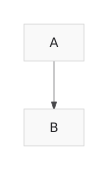
Tuesday was Stateless MCP day - the rollout of MCP 2.0, or the 2026-07-28 Model Context Protocol specification to use the more formal but less memorable name. This is the most significant change to the MCP spec since it first launched, and has also served to reignite my personal interest in the protocol. For background: MCP is the Model Context Protocol, which describes a standard way to expose new tools to LLM-powered agent frameworks. It was introduced by Anthropic back in November 2024, had a huge spike of interest through much of 2025, and then became somewhat eclipsed by Skills (another Anthropic invention) when it became apparent that an agent harness with access to a terminal and curl could do most of what MCP did in a more flexible way. I wrote about that in my review of 2025. I'm coming back around to MCP now. Giving an agent a shell environment with the ability to access the internet is fraught with risk, and requires a strong model that is capable of effectively driving such an environment. MCP tools are easier to audit and control, and simple enough that smaller models that run on a laptop can still drive them reasonably well. The new stateless MCP specification also greatly decreases the complexity of implementing both clients and servers for the protocol. I built three of those this week! What's easier with stateless MCP The best demonstration of the difference between stateful and stateless MCP is in this May 21st blog post that introduced the RC for the new specification. It included a clear before-and-after example. The older stateful MCP (I'm going to call it "legacy MCP") required two HTTP requests - the first to initialize a session and obtain a Mcp-Session-Id, and the second to actually call the tool: POST /mcp HTTP/1.1 Content-Type: application/json { "jsonrpc": "2.0", "id": 1, "method": "initialize", "params": { "protocolVersion": "2025-11-25", "capabilities": { }, "clientInfo": { "name": "my-app", "version": "1.0" } } } POST /mcp HTTP/1.1 Mcp-Session-Id: 1868a90c-3a3f-4f5b Content-Type: application/json { "jsonrpc": "2.0", "id": 2, "method": "tools/call", "params": { "name": "search", "arguments": { "q": "otters" } } } The new stateless way uses a single HTTP request which looks like this: POST /mcp HTTP/1.1 MCP-Protocol-Version: 2026-07-28 Mcp-Method: tools/call Mcp-Name: search Content-Type: application/json { "jsonrpc": "2.0", "id": 1, "method": "tools/call", "params": { "name": "search", "arguments": { "q": "otters" }, "_meta": { "io.modelcontextprotocol/clientInfo": { "name": "my-app", "version": "1.0" } } } } This is so much cleaner from both a client- and server-side implementation perspective. It's also a better fit for building scalable web applications, since now you don't need to maintain server-side state to keep track of those session IDs, or worry about routing the same session to the same backend machine. mcp-explorer I couldn't find a great CLI tool for interactively probing an MCP server, so I had Codex help build my own. mcp-explorer is the result. It's a stateless Python CLI tool, so you don't even need to install it to try it out - it works with uvx like this: uvx mcp-explorer list https://agentic-mermaid.dev/mcp This queries Ade Oshineye's agentic-mermaid.dev demo MCP. The above command returns the following list of tools: execute(code: string, timeoutMs?: integer) - Execute Mermaid SDK code Run JavaScript in an isolated sandbox; return a value. describe_sdk(family: string, detail?: string) - Describe Mermaid SDK operations Return version-matched mutation operations for one diagram family. render_svg(source: string, options?: object) - Render Mermaid as SVG Render a Mermaid source string to themeable SVG. Returns { ok, svg }. render_ascii(source: string, useAscii?: boolean, targetWidth?: integer, options?: object) - Render Mermaid as text Render a Mermaid source string to text. Returns { ok, text }. render_png(source: string, scale?: number, background?: string, fitTo?: object, options?: object) - Render Mermaid as PNG Rasterize a Mermaid source string to PNG. Returns { ok, png_base64 }. ... Then to inspect a tool: uvx mcp-explorer inspect render_svg This outputs a whole bunch of information, including the JSON schema of the inputs and outputs. To call that tool and pass arguments to it: uvx mcp-explorer call \ https://agentic-mermaid.dev/mcp \ render_svg \ -a source 'graph TD; A-->B' \ -a options '{"padding":24}' Which returns: {"ok":true,"svg":"