Claude Fable is relentlessly proactive
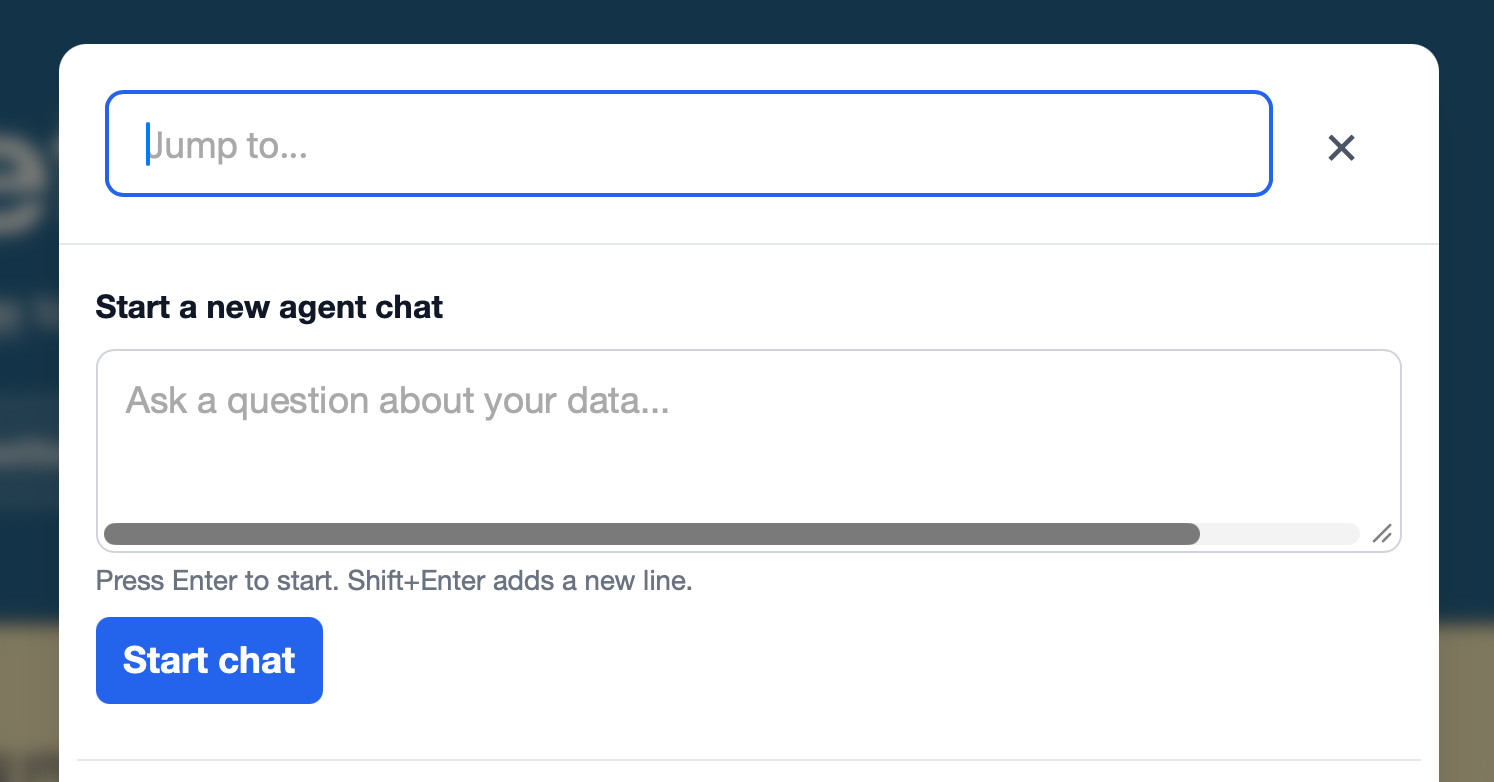
After two days of experience with Claude Fable 5 I think the best way to describe it is relentlessly proactive. It knows a whole lot of tricks and it will deploy pretty much any of them to get to its goal. I'll illustrate this with an example. I was hacking on Datasette Agent today when I noticed a glitch: a horizontal scrollbar that shouldn't be there in the jump menu chat prompt. I snapped this screenshot: Then I started a fresh claude session in my datasette-agent checkout, dragged in the screenshot and told it: Look at dependencies to help figure out why there is a horizontal scrollbar here I had a hunch the cause was in a dependency of Datasette Agent (likely Datasette itself) and I knew Fable was good at digging into dependency code, either by inspecting installed files in its own virtual environment site-packages or by referencing a local checkout on disk. Telling it to start with dependencies felt like a good bet. I got distracted by a domestic task and wandered away from my computer. When I came back a few minutes later I saw my machine open a browser window in my regular Firefox and then navigate to the dialog in question. I had not told Claude Code to use any browser automation, and I was pretty sure it wasn't possible for it to trigger mouse movements or keyboard shortcuts within a window, so how was it doing that? I watched in fascination as it continued with its explorations, then saw it open a Safari window instead of Firefox. I also grabbed this snapshot from the Claude terminal: What was it doing there with uv run --with pyobjc-framework-Quartz? It turns out Fable had hacked up its own pattern for taking screenshots of browser windows. It was using Python to iterate through all available windows on my machine, then filtering for Safari windows with expected strings such as "textarea" in the window name. It used that to find their window number - an integer like 153551 - which it could then use with the screencapture CLI tool to grab a PNG. OK fine, that's a neat way of taking screenshots. But what was it taking screenshots of? Turns out it had been writing its own scratch HTML pages to try and recreate the bug, then opening Safari and grabbing screenshots. Here's that /tmp/textarea-scrollbar-test.html page it created, and the screenshot it took with screencapture -x -o -l 153551 /tmp/safari-cases.png: (I have way too many open tabs!) OK, so I can see how it's opening test pages and taking screenshots, but how on earth was it triggering the modal dialog that was meant to be under test? That's only available via a click or a keyboard shortcut, and I couldn't see a mechanism for it to run those in Safari. I eventually figured out what it had done. Claude was running in a folder that contained the source code for the application. It knows enough about Datasette to be able to run a local development server. It turns out it was editing Datasette's own templates to add JavaScript that would trigger the correct keyboard shortcut as soon as the window opened, adding code like this: 1.2 seconds after the window opens, this code triggers a simulated / key, which is the keyboard shortcut for opening the modal dialog. There was one challenge left. In order to understand what was going on, Claude needed to run JavaScript on the page to take measurements for itself. It wrote its own custom web application to capture information via CORS, then ran that as a local server and opened a page with JavaScript that would POST directly to it! Here's the Python web app it wrote, using the standard library http.server package: from http.server import HTTPServer, BaseHTTPRequestHandler class H(BaseHTTPRequestHandler): def do_POST(self): n = int(self.headers.get("Content-Length", 0)) open("/tmp/diag.json", "w").write(self.rfile.read(n).decode()) self.send_response(200) self.send_header("Access-Control-Allow-Origin", "*") self.end_headers() def do_OPTIONS(self): self.send_response(200) self.send_header("Access-Control-Allow-Origin", "*") self.send_header("Access-Control-Allow-Headers", "*") self.end_headers() def log_message(self, *a): # quiet pass HTTPServer(("127.0.0.1", 9999), H).serve_forever() All this does is accept a POST request full of JSON and write that to the /tmp/diag.json file. It sends Access-Control-Allow-Origin: * headers (including from OPTIONS requests) so that code running on another domain can still communicate back to it. Then Claude injected this code into the template that it was loading in a browser: const host = document.querySelector("navigation-search"); const ta = host.shadowRoot.querySelector("textarea"); const cs = getComputedStyle(ta); fetch("http://127.0.0.1:9999/diag", { method: "POST", body: JSON.stringify({ dpr: window.devicePixelRatio, scrollWidth: ta.scrollWidth, clientWidth: ta.clientWidth, whiteSpace: cs.whiteSpace, width: cs.width, }), }); This took measurements of the inside the Web Component and sent them to the server, which wrote them to a file on disk, which Claude could then read. Having figured out all of these tricks Fable... hit some invisible guardrail and downgraded itself to Opus. Thankfully Opus had access to the full transcript and could continue using the tricks pioneered by Fable, and shortly afterwards found, tested and verified the fix. I prompted Opus to: Write a report in /tmp/automation-report.md where you note down all of the tricks you have used in this session to test against real browsers on my computer, include runnable code examples Which produced this report, which was invaluable for piecing together the details of what had happened for this post. I've shared the full terminal transcript of the Claude Code session as well. A review of everything it did Based on a screenshot and a one-line prompt, Claude Fable 5 + Claude Code: Figured out the recipe to run the local development server (with fake environment variables needed to get it running) Fired up a Playwright Chrome session Turned on the visible scrollbars setting for Chrome defaults write com.google.chrome.for.testing AppleShowScrollBars Always (it turned that off again later) Cycled through Firefox and WebKit in Playwright too, failing to recreate the bug Worked out my default browser was Safari Built a textarea-scrollbar-test.html HTML document Opened that in real (not Playwright) Firefox Found that osascript -e 'tell application "System Events" to tell process "firefox" to id of window 1' was blocked because "osascript is not allowed assistive access" Figured out that uv run --with pyobjc-framework-Quartz python workaround, described above Added JavaScript to the site templates in order to trigger the / key Built its own little Python CORS web server to capture JSON data Rewrote the template to capture that data and send it to the server Scripted its way through the Web Component shadow DOM to the information it needed Modified its custom template to hack in a potential fix Confirmed the hacked fix worked Reported back on how to fix the problem Like I said, relentlessly proactive! I really need to lock this thing down On the one hand, watching Fable go to extreme lengths to get the information that it needed to debug what was, in the end, a two-line CSS fix, was fascinating. But on the other hand... this is a robust reminder that coding agents can do anything you can do by typing commands into a terminal - and frontier models know every trick in the book and evidently a few that nobody has ever written down before. If Fable had been acting on malicious instructions - a prompt injection attack hidden in code or an issue thread, or something I'd carelessly pasted into my terminal - it's alarming to think quite how far it could go to exfiltrate data or cause other forms of mischief. Running coding agents outside of a sandbox has always been a bad idea - it's my top contendor for a Challenger disaster incident, as described by Johann Rehberger in The Normalization of Deviance in AI. Fable is arguably smarter and hence more suspicious of potentially malicious instructions. But that smartness is very much a two-edged sword: if it does get subverted by instructions, the amount of damage it can do given its relentless proactivity is terrifying. Tags: ai, prompt-injection, generative-ai, llms, ai-assisted-programming, coding-agents, claude-code, claude-mythos